API category list
Buttons, menus, static controls, list boxes, and combo boxes can be created using an owner-drawn style. Under normal circumstances, Windows is responsible for drawing the appearance of these controls. However, when a control is created with an owner-drawn style, Windows suppresses its default drawing routine and instead sends WM_DRAWITEM messages to the parent window whenever the control needs to be painted.
For owner-drawn controls that contain variable-sized items, such as certain list boxes and combo boxes, Windows also sends WM_MEASUREITEM messages. These allow the parent window to specify the size of each individual item before it is drawn.
By processing these messages, the parent window assumes responsibility for drawing the control. This enables the developer to create a completely customised appearance, including the use of different colours, fonts, images, icons, gradients, and other graphical effects that are not available with the standard control styles.
Example
The application below consists of a customised listbox and a customised static box. The customised listbox displays a small bitmap next to each list item. Selecting any item will copy the Listbox item to the static box

Example
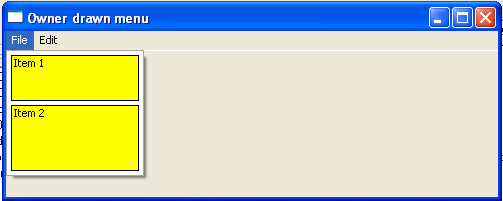
The application below displays a customised menu. Clicking the file options displays a user-defined drop-down list
- Details
- Category: API category list
- Hits: 455
Hooking is a technique used to intercept events or function calls so that an application can monitor, modify, or suppress their normal behaviour. The code that intercepts these events is called a hook procedure. A hook procedure can examine each event it receives, act on it, modify it, or pass it unchanged to the next hook procedure in the chain.
Windows allows developers to install hooks using the SetWindowsHookEx() API function. When an event such as a key press, mouse action, or window message occurs, Windows calls the appropriate hook procedure before the event reaches its normal destination. A hook chain is a list of application-defined hook procedures. Whenever an event associated with a particular hook type occurs, Windows passes the event to each hook procedure in the chain in turn.
Some types of hooks, particularly global hooks that monitor events in other processes, require the hook procedure to reside in a DLL. Windows loads this DLL into the address space of each target process so that the hook procedure can execute in that process. This mechanism is often referred to as DLL injection. DLL injection can also be performed by other techniques that do not involve Windows hooks and is commonly used by debugging tools, accessibility software, and application extensions, although it can also be misused by malicious software.
The prototype for SetWindowsHookEx is
HOOK SetWindowsHookEx(int idHook,HOOKPROC lpfn,HINSTANCE hmod,DWORD dwThreadId);
Where
idHook – is the type of hook procedure to be installed. This parameter can be one of the following values.
WH_DEBUG – used to monitor messages before the system sends them to the destination window procedure.
WH_CALLWNDPROCRET – used to monitor messages processed by the destination window procedure.
WH_CBT – used to receive notifications useful to a CBT application
WH_DEBUG – used when the application’s foreground thread is about to become idle.
WH_FOREGROUNDIDLE – used for performing low-priority tasks during idle time.
WH_JOURNALPLAYBACK – used to post messages previously recorded by a WH_JOURNALRECORD hook procedure.
WH_JOURNALRECORD – used to record input messages posted to the system message queue.
WH_KEYBOARD – used to monitor keystroke messages.
WH_KEYBOARD_LL – used to monitor low-level keyboard input events.
WH_MOUSE – Installs a hook procedure that monitors mouse messages.
WH_MOUSE_LL – used to monitor low-level mouse input events.
WH_MSGFILTER – used to monitor input events in a dialog box, message box, menu, or scroll bar.
WH_SHELL – used to monitor shell applications
WH_SYSMSGFILTER – used to monitor messages generated by an input event in a dialog box, message box, menu, or scroll bar.
Lpfn – A pointer to the hook procedure.
Hmod – A handle to the DLL containing the hook procedure pointed to by the lpfn parameter.
DwThreadId – The thread identifier with which the hook procedure is associated.
Return value – If the function succeeds, the return value is the handle to the hook procedure. If the function fails, the return value is NULL.
For detailed reading on the SetWindowsHookExA – https://docs.microsoft.com/en-us/windows/win32/api/winuser/nf-winuser-setwindowshookexa
The hook procedure
A hook procedure has the following syntax:
LRESULT CALLBACK HookProc(int nCode, WPARAM wParam, LPARAM lParam) { return CallNextHookEx(NULL, nCode, wParam, lParam); }
The nCode parameter is used to determine the action to perform. The value of the hook code depends on the type of the hook. The wParam and lParam parameters depend on the hook code, but they typically contain information about a message that was sent or posted
Calling the CallNextHookEx function to chain to the next hook procedure is not necessary, but it is highly recommended. This will enable other applications that have installed hooks to receive hook notifications and behave normally.
For further detailed reading about hooking
https://docs.microsoft.com/en-us/windows/win32/winmsg/about-hooks
Example
The following two examples demonstrate the use of the WH_KEYBOARD_LL hook. Each program installs a low-level keyboard hook, intercepts keyboard events, converts each virtual key into a readable name using GetKeyNameText(), and records the results in a text file. Pressing the Escape key removes the hook and terminates the program.
Both examples are written as Win32 Console Applications. They record keystrokes, not the characters ultimately produced by the keyboard. For example, pressing Shift+A records the individual key events rather than the character ‘A’. When creating the project, select the Console Application template rather than a Windows GUI application.
The first example (below) uses the WH_KEYBOARD hook. The hook procedure resides in a separate DLL, which is loaded using explicit linking. Windows injects the DLL into the address space of processes that receive keyboard input, allowing the hook procedure to monitor keyboard messages. The hook remains active until UnhookWindowsHookEx() is called, which occurs when the Enter key is pressed or when the console application is closed.
The second example (below) uses the WH_KEYBOARD_LL (low-level keyboard) hook. The hook procedure is exported from the executable itself rather than from a DLL. Unlike WH_KEYBOARD, the callback executes in the context of the application that installed the hook and therefore does not require process injection. Because the callback is delivered through the application’s message queue, the program must continue running and maintain a Windows message loop while the hook is active. The hook remains installed until UnhookWindowsHookEx() is called, which occurs when the Escape key is pressed or when the console application is closed.
WH_KEYBOARD versus WH_KEYBOARD_LL
Windows provides two keyboard hook types: WH_KEYBOARD and WH_KEYBOARD_LL. Although both allow an application to monitor keyboard activity, they operate in different ways and are intended for different purposes.
The WH_KEYBOARD hook is a traditional keyboard hook that monitors keyboard messages retrieved from a thread’s message queue. Because the hook procedure executes in the context of the target process, it must be implemented in a separate DLL so that Windows can load it into the address space of each process that receives keyboard input. On 64-bit versions of Windows, separate 32-bit and 64-bit DLLs are required if both types of applications are to be monitored.
The WH_KEYBOARD_LL hook is a low-level keyboard hook introduced with Windows 2000. Unlike WH_KEYBOARD, the hook procedure executes in the context of the application that installed the hook and therefore does not need to reside in a DLL. This makes low-level keyboard hooks significantly easier to implement and debug. However, because the callback executes in the installing process, that process must remain running and continue processing its message loop for the hook to remain active.
In most situations where an application simply needs to monitor or process keyboard input, WH_KEYBOARD_LL is the preferred choice. The older WH_KEYBOARD hook is generally only required when compatibility with legacy code or specialised message-hooking behaviour is needed.
- Details
- Category: API category list
- Hits: 437
The Win32 API offers a set of functions for accessing and managing disk files. This is in addition to the I/O functions available as part of the C and C++ runtime libraries. A selection of these API functions is outlined below.
For further reading on the full list of file management functions
https://docs.microsoft.com/en-us/windows/win32/fileio/file-management-functions
Creating and Opening Files
All types of files can be created and opened with the API function CreateFile(). Windows assigns a file handle to each file that is opened or created. This handle is then used to access that file. File handles are valid until closed with the CloseHandle() function, which closes the file and flushes the buffers. The prototype of this function is
HANDLE CreateFile(LPCSTR lpFileName,DWORD dwAccess,DWORD dwShareMode,LPSECURITY_ATTRIBUTES lpSecurityAttributes,DWORD dwCreationDisposition,DWORD dwFlagsAndAttributes,HANDLE hTemplateFile);
Where
lpFileName - The name of the file or device to be created or opened with a backslash (\) to separate the components of a path.
dwAccess - The requested access to the file or device, which can be summarized as read, write, both or neither
dwShareMode - read, write, both, delete, all of these, or none.
lpSecurityAttributes - determines whether the child processes can be inherited the returned handle. This parameter can be NULL.
dwCreationDisposition - An action to take on a file or device that exists or does not exist.
dwFlagsAndAttributes - file or device attributes and flag
hTemplateFile - handle to a template file that supplies file attributes and extended attributes for the file that is being created. This parameter can be NULL.
If the function succeeds, the return value is an open handle to the specified file. If the function fails, the return value is INVALID_HANDLE_VALUE
Reading From and Writing to a File
When a file is first opened, Windows places a file pointer at the start of the file. Windows then advances the file pointer after the next read or write operation. An application can also move the file pointer position with the SetFilePointer() function. An application performs read and write operations with the ReadFile() and WriteFile() API functions. The prototype of these functions are -
BOOL ReadFile(HANDLE hFile,LPVOID lpBuffer,DWORD nNumberOfBytes,LPDWORD lpNumberOfBytes,LPOVERLAPPED lpOverlapped);
BOOL WriteFile(HANDLE hFile, LPCVOID lpBuffer, DWORD nNumberOfBytes, LPDWORD lpNumberOfBytes, LPOVERLAPPED lpOverlapped );
Where
hFile - A handle to the device
lpBuffer - A pointer to the buffer that holds the data to be read or written.
nNumberOfBytes - The maximum number of bytes to be read or written.
lpNumberOfBytes - Number of bytes read or written when using a synchronous hFile parameter.
lpOverlapped - A pointer to an OVERLAPPED structure.
If the function succeeds, the return value is nonzero. If the function fails the return value is zero.
When the file pointer reaches the end of the file any attempts to read any further data will return an error.
Windows allows more than one application to open a file and write to it. To prevent two applications from trying to write to the same file simultaneously, an application can lock the shared file area with the LockFile() function (see below). Locking part of a file prevents other processes from reading or writing anywhere in the specified area. When the application has completed its file operations it can unlock that region of the file using the UnlockFile() function. All locked regions of a file should be unlocked before closing a file.
The code section below demonstrates the API functions ReadFile() and WriteFile() by creating and then writing to a simple text file and then reading the contents before displaying them in a messagebox
#include <windows.h>
int APIENTRY WinMain( HINSTANCE hInst, HINSTANCE hPrev, LPSTR lpCmdLine, int nCmdShow )
{
 HANDLE hFile;
// create the file.
hFile = CreateFile( TEXT("FILE1.TXT"), GENERIC_READ | GENERIC_WRITE,FILE_SHARE_READ, NULL, OPEN_ALWAYS,FILE_ATTRIBUTE_NORMAL, NULL );
if ( hFile != INVALID_HANDLE_VALUE )
{
DWORD dwByteCount;
TCHAR szBuf[64]=TEXT("/0");
// Write a simple string to hfile.
WriteFile( hFile, "This is a simple message", 25, &dwByteCount, NULL );
// Set the file pointer back to the beginning of the file.
SetFilePointer( hFile, 0, 0, FILE_BEGIN );
// Read the string back from the file.
ReadFile( hFile, szBuf, 128, &dwByteCount, NULL );
// Null terminate the string.
szBuf[dwByteCount] = 0;
// Close the file.
CloseHandle( hFile );
//output message with string if successful
 MessageBox( NULL, TEXT("File created"), TEXT(""), MB_OK );
}
else
{
//output message if unsuccessful
 MessageBox( NULL, TEXT("File not created"), TEXT(""), MB_OK );
}
 return 0;
}
CopyFile
Copies an existing file to a new file but not the security attributes. The prototype of the copyfile() API function is
BOOL CopyFile(LPCTSTR lpExistingFileName,LPCTSTR lpNewFileName,BOOL bFailIfExists);
Where
lpExistingFileName - The name of an existing file.
lpNewFileName - The name of the new file.
bFailIfExists - If this parameter is TRUE and the new file already exists the function fails. If this parameter is FALSE and the new file already exists, the function overwrites the existing file and returns true.
If the function succeeds, the return value is nonzero. If the function fails, the return value is zero.
CreateDirectory
Creates a new directory. The function applies a specified security descriptor to the new directory if the underlying file system is NTFS or one that supports security on files and directories. The prototype of this function is
BOOL CreateDirectory(LPCSTR lpPathName,LPSECURITY_ATTRIBUTES lpSecurityAttributes);
lpPathName - The path of the directory to be created
lpSecurityAttributes - A pointer to a SECURITY_ATTRIBUTES structure
Returns TRUE if successful; otherwise, the return value is FALSE.
DeleteFile
Deletes an existing file. If an application attempts to delete an open file or a file that does not exist, the function fails. The prototype of this function is
BOOL DeleteFile(LPCSTR lpFileName);
Where LpFileName is the name of the file to be deleted. If the function succeeds, the return value is nonzero. If the function fails, the return value is zero (0).
GetFileAttributes
Retrieves file system attributes for a specified file or directory. The prototype of this function is
DWORD GetFileAttributes(LPCSTR lpFileName);
Where lpFileName is the name of the file or directory. If the function succeeds, the return value contains the attributes of the specified file or directory. If the function fails, the return value is INVALID_FILE_ATTRIBUTES.
MoveFile
Moves an existing file or a directory to a new location on a volume. MoveFile will fail on directory moves when the destination is on a different volume. The prototype for this function is
BOOL MoveFile(LPCTSTR lpExistingFileName,LPCTSTR lpNewFileName);
LpExistingFileName - The name of the file or directory on the local computer.
LpNewFileName - The new name for the file or directory.
If the function succeeds, the return value is nonzero. If the function fails, the return value is zero.
RemoveDirectory.
Deletes the specified empty directory. The prototype of this function is
BOOL RemoveDirectory( LPCTSTR lpszDir );
Where lpszDir is a pointer to a null-terminated string that contains the path of the directory to be removed. The directory must be empty and the calling process must have delete access to the directory. Returns true if successful; otherwise, the return value is FALSE.
LockFile
Locks a region in an open file. The prototype for this function is
BOOL LockFile(HANDLE hFile,DWORD dwFileOffsetLow,DWORD dwFileOffsetHigh,DWORD nNumberOfBytesToLockLow,DWORD nNumberOfBytesToLockHigh);
where
hFile - A handle to the file.
dwFileOffsetLow - The low-order 32 bits of the starting byte offset in the file where the lock should begin.
dwFileOffsetHigh - The high-order 32 bits of the starting byte offset in the file where the lock should begin.
nNumberOfBytesToLockLow- The low-order 32 bits of the length of the byte range to be locked.
nNumberOfBytesToLockHigh -The high-order 32 bits of the length of the byte range to be locked.
If the function succeeds, the return value is nonzero (TRUE). If the function fails, the return value is zero (FALSE).
UnlockFile
Unlocks a region in an open file
BOOL UnlockFile(HANDLE hFile,DWORD dwFileOffsetLow,DWORD dwFileOffsetHigh,DWORD nNumberOfBytesToUnlockLow,DWORD nNumberOfBytesToUnlockHigh);
where
hFile - A handle to the file that contains a region locked with LockFile.
dwFileOffsetLow - The low-order word of the starting byte offset in the file where the locked region begins.
dwFileOffsetHigh - The high-order word of the starting byte offset in the file where the locked region begins.
nNumberOfBytesToUnlockLow - The low-order word of the length of the byte range to be unlocked.
nNumberOfBytesToUnlockHigh - The high-order word of the length of the byte range to be unlocked.
If the function succeeds, the return value is nonzero. - If the function fails, the return value is zero.
- Details
- Category: API category list
- Hits: 440
The string manipulation functions of the Win32 API allow an application to test and manipulate the contents of a string. A selection of these is listed below. For a full list of string manipulation functions - https://docs.microsoft.com/en-us/windows/win32/menurc/string-functions
CharLower
Translates a character string to lowercase.
LPSTR CharLower(LPSTR lpsz);
Where lpsz is a null-terminated string or specifies a single character. If the operand is a character string, the function returns a pointer to the converted string.
CharNext
Retrieves a pointer to the next character in a string. The prototype for this function is
LPSTR CharNext(LPCSTR lpsz);
Where lpsz is a character in a null-terminated string. The return value is a pointer to the next character in the string, or to the terminating null character if at the end of the string.
CharPrev
Positions pointer to the previous character in a string.
LPSTR CharPrev(LPCSTR lpszStart,LPCSTR lpszCurrent);
where
LpszStart - The beginning of the string.
LpszCurrent - A character in a null-terminated string.
The return value is a pointer to the preceding character in the string, or to the first character in the string
CharUpper
Converts a character string to uppercase. The prototype for this function is
LPSTR CharUpper(LPSTR lpsz);
Where lpsz is a null-terminated string or a single character. If the operand is a character string, the function returns a pointer to the converted string.
IsCharAlpha
Determines whether a character is an alphabetical character.
BOOL IsCharAlpha(CHAR ch);
Where ch is the character to be tested. If the character is alphabetical, the return value is nonzero. If the character is not alphabetical, the return value is zero.
IsCharAlphaNumberic
Determines whether a character is an alphanumeric character.
BOOL IsCharAlpha(CHAR ch);
Where ch is the character to be tested. If the character is alphanumeric, the return value is nonzero. If the character is not alphanumeric, the return value is zero.
IsCharLower
Determines whether a character is lowercase.
BOOL IsCharLower(CHAR ch);
Were ch is the character to be tested. If the character is lowercase, the return value is nonzero. If the character is not lowercase, the return value is zero.
IsCharUpper
Determines whether a character is uppercase.
BOOL IsCharLower(CHAR ch);
Where ch is the character to be tested. If the character is uppercase, the return value is nonzero. If the character is not uppercase, the return value is zero.
Lstrlen
Determines the length of the specified string excluding the terminating null character.
int lstrlen(LPCSTR lpString);
Where lpString is the null-terminated string to be checked.
The function returns the length of the string, in characters.
Example
The following short program demonstrates various API string manipulation functions

- Details
- Category: API category list
- Hits: 491
The Win32 API provides system information data about the environment under which the application is running. This information includes the process environment variables, time, default locale settings for the system and user, system colour settings, drive information, system parameters, OS information, processor type and the computer name. A small selection of these functions are listed below.
For a full description of these functions - https://docs.microsoft.com/en-us/windows/win32/sysinfo/system-information-functions
GetComputerName
Returns the system computer name
BOOL GetComputerName(LPSTR lpBuffer,LPDWORD nSize);
Where
LpBuffer is a pointer to a buffer that receives the computer name or the cluster virtual server name and nSize specifies the size of the buffer. If the function succeeds, the return value is nonzero. If the function fails, the return value is zero.
GetSystemDirectory
Retrieves the path of the system directory.
UINT GetSystemDirectoryA(LPSTR lpBuffer,UINT uSize);
Where
PBuffer is a pointer to the buffer to receive the path and USize is the maximum buffer size. If the function succeeds, the return value is the length. If the function fails, the return value is zero.
GetCurrentDirectory
Retrieves the current directory for the current process.
DWORD GetCurrentDirectory(DWORD nBufferLength,LPTSTR lpBuffer);
Where nBufferLength is the buffer length for the current directory string and lpBuffer is a pointer to the buffer that receives the current directory string. If the function succeeds, the return value specifies the number of characters written to the buffer, not including the terminating null character. If the function fails, the return value is zero.
GetEnvironmentVariable
Retrieves the contents of the specified variable from the environment block of the calling process.
DWORD GetEnvironmentVariable(LPCTSTR lpName,LPTSTR lpBuffer,DWORD nSize);
Where
lpName - The name of the environment variable.
lpBuffer - A pointer to a buffer that receives the contents of the specified environment variable as a null-terminated string.
nSize - The buffer size pointed to by the lpBuffer parameter, including the null-terminating character, in characters.
If the function succeeds, the return value is the number of characters stored in the buffer pointed to by. If the function fails, the return value is zero.
GetLocalTime
Retrieves the current local date and time.
void GetLocalTime(LPSYSTEMTIME lpSystemTime);
where lpSystemTime is a pointer to a SYSTEMTIME structure to receive the current local date and time.
Example
The following short program demonstrates various system information functions
- Details
- Category: API category list
- Hits: 480